VPN Security Best Practices Tips for a Safer Online Experience
Beyond choosing a secure VPN, learn best practices for a safer online experience. Tips for configuring your VPN and maintaining digital hygiene.
Beyond choosing a secure VPN, learn best practices for a safer online experience. Tips for configuring your VPN and maintaining digital hygiene.
VPN Security Best Practices Tips for a Safer Online Experience
So, you've made the smart move and invested in a Virtual Private Network (VPN) to boost your online privacy and security. That's a fantastic first step! But here's the thing: simply installing a VPN app isn't a magic bullet that instantly makes you invisible and impenetrable online. Think of it like buying a high-tech security system for your home. You still need to lock your doors, close your windows, and maybe even set up some motion sensors, right? The same goes for your VPN. To truly maximize your online safety and get the most out of your VPN, you need to adopt some best practices and maintain good digital hygiene. This article will walk you through essential tips and configurations to ensure you're as secure as possible, whether you're browsing from the USA or navigating the digital landscape in Southeast Asia.
Understanding Your VPN The Foundation of Digital Hygiene
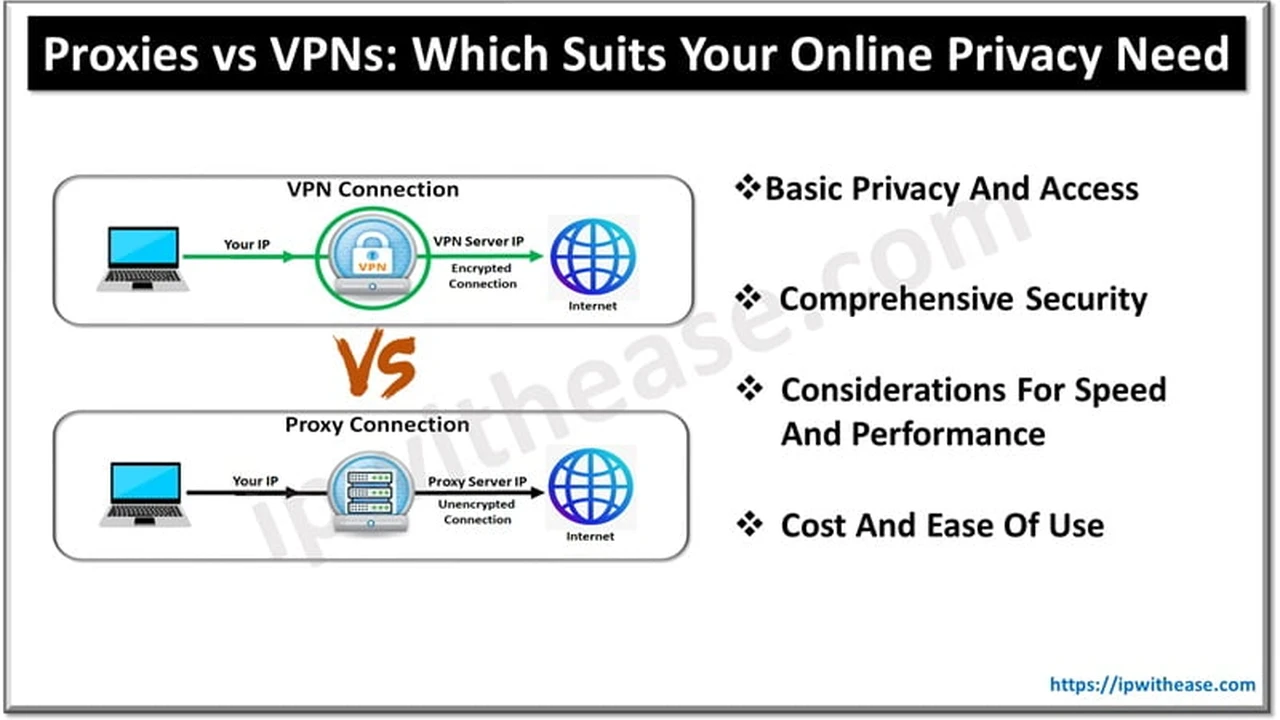
Before we dive into the nitty-gritty, let's quickly recap what a VPN does and why it's so crucial. A VPN creates an encrypted tunnel between your device and the internet. This tunnel hides your IP address, encrypts your data, and makes it incredibly difficult for anyone – be it your Internet Service Provider (ISP), government agencies, or cybercriminals – to snoop on your online activities. But the effectiveness of this tunnel depends not just on the VPN provider, but also on how you use it.
Always On Always Protected Maximizing VPN Uptime
One of the most fundamental best practices is to keep your VPN connected as much as possible. It might sound obvious, but many users only turn on their VPN when they think they need it, like when accessing public Wi-Fi or streaming geo-restricted content. This leaves significant gaps in your protection. Your home network, while seemingly safe, can still be vulnerable to various threats, and your ISP can still track your activities. For comprehensive protection, make it a habit to have your VPN running in the background whenever you're online.
Configuring Auto-Connect for Seamless Security
Most reputable VPN services offer an auto-connect feature. This means your VPN will automatically connect when your device starts up or when it detects an internet connection. This is a game-changer for consistent protection. Look for this option in your VPN app's settings. For example, NordVPN, ExpressVPN, and Surfshark all have robust auto-connect features that you can easily enable. This is particularly useful for mobile devices, ensuring you're protected even when switching between Wi-Fi networks and mobile data.
The Kill Switch Your Digital Lifeline Preventing Data Leaks
A kill switch is a non-negotiable feature for any privacy-conscious VPN user. What does it do? If your VPN connection unexpectedly drops, a kill switch automatically cuts off your internet access. This prevents your real IP address and unencrypted data from being exposed, even for a split second. Without a kill switch, a momentary VPN disconnection could reveal your online activities to your ISP or other prying eyes. Always ensure your VPN's kill switch is enabled.
Testing Your Kill Switch for Optimal Performance
It's a good idea to periodically test your kill switch to ensure it's working correctly. You can do this by connecting to your VPN, then intentionally disconnecting it (e.g., by force-quitting the app or disabling your network adapter) and observing if your internet access is indeed cut off. If it's not, check your VPN settings or contact their support. Most top-tier VPNs like Proton VPN, Private Internet Access (PIA), and CyberGhost offer reliable kill switch functionalities.
Choosing the Right VPN Protocol Balancing Speed and Security
VPN protocols are the rules that determine how your data is encrypted and transmitted. Different protocols offer varying balances of speed, security, and stability. While your VPN app might default to a certain protocol, understanding your options allows you to make informed choices for specific scenarios.
- OpenVPN: Often considered the gold standard for security and reliability. It's open-source, meaning its code can be publicly audited for vulnerabilities. It's a great all-rounder for most users.
- WireGuard: A newer protocol that's rapidly gaining popularity due to its incredible speed and modern cryptographic techniques. It's generally faster than OpenVPN while maintaining strong security.
- IKEv2/IPsec: Known for its stability and ability to quickly re-establish connections, making it ideal for mobile users who frequently switch networks.
- L2TP/IPsec and PPTP: Generally less secure and not recommended for privacy-critical tasks. Avoid these if possible.
When to Switch Protocols Optimizing Your VPN Experience
For everyday browsing and general security, OpenVPN (UDP) or WireGuard are excellent choices. If you're experiencing slow speeds, try switching to WireGuard if available. For mobile users, IKEv2 can offer better stability. Experiment with the protocols offered by your VPN provider to find the best fit for your needs. For instance, NordVPN's NordLynx is their custom implementation of WireGuard, offering impressive speeds, while ExpressVPN's Lightway is another proprietary protocol designed for speed and security.
Server Selection Matters Proximity and Purpose
The server you connect to can significantly impact your VPN's performance and your online experience. Don't just pick the first server on the list.
Proximity for Speed
Generally, connecting to a server geographically closer to you will result in faster speeds and lower latency. If you're in the USA and just want to secure your connection, picking a server in your state or a neighboring one is usually best. Similarly, for users in Southeast Asia, choosing a server in a nearby country like Singapore or Malaysia can provide optimal performance.
Purpose for Access
If you're trying to access geo-restricted content, you'll need to connect to a server in the country where that content is available. For example, to watch US Netflix, you'll need a US server. Some VPNs, like Surfshark and CyberGhost, even offer specialized servers optimized for streaming or torrenting, which can further enhance your experience.
Beyond the Basics Advanced VPN Features for Enhanced Security
Many premium VPNs offer a suite of advanced features that can further bolster your security and privacy. Don't overlook these!
Split Tunneling Selective VPN Protection
Split tunneling allows you to choose which apps or websites use the VPN tunnel and which access the internet directly. This is incredibly useful for tasks where you need local network access (e.g., printing) or want to save VPN bandwidth for specific activities. For example, you could route your streaming app through the VPN while your banking app uses your regular internet connection. ExpressVPN, NordVPN, and Surfshark all offer excellent split tunneling features.
Obfuscated Servers Hiding Your VPN Use
In regions with strict internet censorship or where VPN use is frowned upon (like some parts of Southeast Asia), obfuscated servers can be a lifesaver. These servers disguise your VPN traffic as regular internet traffic, making it harder for deep packet inspection (DPI) to detect and block your VPN connection. If you're in a restrictive environment, look for VPNs like NordVPN (with their 'Obfuscated Servers' option) or Proton VPN (with their 'Stealth' protocol) that offer this capability.
Ad Blockers and Malware Protection Integrated Security
Some VPNs come with built-in ad blockers and malware protection. While not a replacement for dedicated antivirus software, these features can significantly enhance your browsing experience by blocking intrusive ads and preventing access to known malicious websites. NordVPN's Threat Protection and CyberGhost's Content Blocker are good examples of such integrated security tools.
Dedicated IP Addresses For Specific Use Cases
While most VPNs assign you a shared IP address (which enhances anonymity), some offer dedicated IP addresses for an additional fee. A dedicated IP can be useful for accessing services that block shared VPN IPs, maintaining a consistent online identity for specific tasks, or for secure remote access to corporate networks. Providers like NordVPN and CyberGhost offer dedicated IP options.
Regular Updates and Software Maintenance Staying Secure
Just like any other software, your VPN app needs to be kept up-to-date. Developers constantly release updates to patch security vulnerabilities, improve performance, and add new features. Ignoring these updates leaves you exposed to known threats.
Enable Automatic Updates
Whenever possible, enable automatic updates for your VPN app. This ensures you're always running the latest, most secure version without having to manually check. If automatic updates aren't an option, make it a point to check for updates regularly.
Public Wi-Fi Safety Your VPN's Primary Mission
Public Wi-Fi networks (in cafes, airports, hotels, etc.) are notorious hotspots for cybercriminals. They are often unsecured, making it easy for attackers to intercept your data. This is where your VPN truly shines.
Always Use Your VPN on Public Wi-Fi
This is a golden rule. Never connect to public Wi-Fi without your VPN enabled. It encrypts all your traffic, protecting you from eavesdropping, man-in-the-middle attacks, and other threats lurking on unsecured networks. Even if you're just checking social media, your VPN provides a crucial layer of defense.
Strong Passwords and Two-Factor Authentication The Human Element of Security
Your VPN protects your data in transit, but your accounts themselves need protection too. Even the best VPN can't save you if your email or banking password is '123456'.
Implement Strong Unique Passwords
Use strong, unique passwords for all your online accounts, especially your VPN account. A password manager can help you generate and store these securely. Never reuse passwords across different services.
Enable Two-Factor Authentication (2FA)
Wherever possible, enable 2FA on your VPN account and other critical online services. This adds an extra layer of security, requiring a second verification step (like a code from your phone) in addition to your password. Even if someone gets your password, they won't be able to access your account without that second factor.
Regular Security Audits and Checks Verifying Your Protection
It's a good practice to periodically check if your VPN is working as intended and not leaking any information.
IP Leak Tests
Use online tools to check for IP leaks (IPv4, IPv6) and DNS leaks. Websites like ipleak.net or dnsleaktest.com can quickly show you if your real IP address or DNS requests are being exposed. If you detect a leak, consult your VPN provider's support or try switching servers/protocols.
WebRTC Leak Tests
WebRTC (Web Real-Time Communication) is a technology that allows real-time communication in web browsers. However, it can sometimes reveal your real IP address even when a VPN is active. Many VPNs have built-in WebRTC leak protection, but it's worth checking. You can find WebRTC leak test tools online.
Understanding Your VPN Provider's Logging Policy Trust and Transparency
Even with all these best practices, the foundation of your privacy lies with your VPN provider's commitment to a no-logs policy. A no-logs VPN means they do not collect, store, or share any data about your online activities.
Look for Independent Audits
The best VPNs undergo independent audits of their no-logs policy and security infrastructure. These audits provide external verification that the VPN lives up to its privacy claims. For example, NordVPN and ExpressVPN have both undergone multiple independent audits of their no-logs policies, providing a strong level of trust.
Digital Hygiene Beyond the VPN A Holistic Approach
While your VPN is a powerful tool, it's part of a larger ecosystem of digital hygiene. Consider these additional tips for a truly safer online experience:
- Use a Secure Browser: Browsers like Brave or Firefox (with enhanced tracking protection) offer better privacy than default options.
- Be Mindful of Permissions: Review app permissions on your phone and computer. Limit what apps can access.
- Clear Browser Cache and Cookies: Regularly clear your browser's cache and cookies to remove tracking data.
- Avoid Suspicious Links and Downloads: Phishing attempts and malware often come through deceptive links or attachments.
- Encrypt Your Devices: Ensure your laptop and phone are encrypted. This protects your data if your device is lost or stolen.
Specific Product Recommendations for Enhanced Security
Let's look at a few top-tier VPNs that excel in security features and are great for implementing these best practices:
1. NordVPN
- Key Security Features: AES-256 encryption, NordLynx protocol (WireGuard-based), Double VPN (multi-hop), Obfuscated servers, Kill Switch, Threat Protection (ad/malware blocker), DNS leak protection.
- Use Cases: Excellent for general privacy, bypassing censorship in restrictive regions (e.g., parts of Southeast Asia), secure streaming, and torrenting. Their Threat Protection adds an extra layer against online threats.
- Pricing: Typically offers competitive long-term plans (2-year plans often provide the best value), with a 30-day money-back guarantee. Expect around $3-5 per month for a long-term subscription.
- Why it's good for best practices: Their comprehensive feature set makes it easy to enable multiple layers of security, and their auto-connect and kill switch are highly reliable.
2. ExpressVPN
- Key Security Features: AES-256 encryption, Lightway protocol (proprietary, WireGuard-inspired), TrustedServer technology (RAM-only servers), Kill Switch (Network Lock), DNS leak protection, Split Tunneling.
- Use Cases: Ideal for users prioritizing speed and reliability alongside strong security. Great for streaming, gaming, and general secure browsing, especially in the USA and Southeast Asia due to their extensive server network.
- Pricing: Generally on the higher end, but offers premium performance and features. Long-term plans (12-month) are the most cost-effective, often around $6-8 per month, with a 30-day money-back guarantee.
- Why it's good for best practices: Their TrustedServer technology ensures no data is ever written to hard drives, enhancing privacy. The Network Lock (kill switch) is robust, and Lightway offers a great balance of speed and security.
3. Proton VPN
- Key Security Features: AES-256 encryption, OpenVPN, WireGuard, IKEv2 protocols, Secure Core servers (multi-hop through privacy-friendly countries), Kill Switch, NetShield (ad/malware blocker), Stealth protocol (obfuscation).
- Use Cases: Excellent for users with extreme privacy concerns, journalists, and activists. Their free tier is also one of the best available for basic privacy. Strong choice for users in the USA and Southeast Asia seeking maximum anonymity.
- Pricing: Offers a generous free plan with unlimited data (though limited servers/speed). Paid plans are competitive, with long-term options around $5-10 per month, backed by a 30-day money-back guarantee.
- Why it's good for best practices: Their Secure Core architecture and Stealth protocol provide advanced protection against sophisticated surveillance, making it a top choice for digital hygiene.
4. Private Internet Access (PIA)
- Key Security Features: Customizable AES encryption (128-bit or 256-bit), OpenVPN, WireGuard, IKEv2 protocols, Advanced Kill Switch, MACE (ad/malware blocker), DNS leak protection, Port Forwarding.
- Use Cases: Great for users who want a highly customizable VPN experience and strong security at a very affordable price. Popular for torrenting due to port forwarding and strong privacy features.
- Pricing: One of the most budget-friendly premium VPNs, especially on long-term plans (often 2-3 years), costing around $2-4 per month, with a 30-day money-back guarantee.
- Why it's good for best practices: Their advanced kill switch and MACE feature contribute to robust digital hygiene, and the customizable encryption allows users to balance speed and security to their preference.
Final Thoughts on Your Secure Online Journey
Adopting these VPN security best practices isn't about being paranoid; it's about being proactive and smart in an increasingly complex digital world. Your VPN is a powerful tool, but its effectiveness is amplified when combined with good digital hygiene. By keeping your VPN always on, enabling the kill switch, choosing the right protocols and servers, leveraging advanced features, and maintaining overall strong security habits, you're taking significant steps towards a safer, more private online experience. Stay vigilant, stay updated, and enjoy the peace of mind that comes with robust digital protection.
:max_bytes(150000):strip_icc()/277019-baked-pork-chops-with-cream-of-mushroom-soup-DDMFS-beauty-4x3-BG-7505-5762b731cf30447d9cbbbbbf387beafa.jpg)