VPN Features Explained Split Tunneling Kill Switch Ad Blocker
Demystify essential VPN features. Learn about split tunneling, kill switches, ad blockers, and their benefits for your online experience.
Demystify essential VPN features. Learn about split tunneling, kill switches, ad blockers, and their benefits for your online experience.
VPN Features Explained Split Tunneling Kill Switch Ad Blocker
Hey there, digital explorer! Ever wondered what all those fancy terms like 'split tunneling,' 'kill switch,' and 'ad blocker' mean when you're looking at VPNs? You're not alone. VPNs are packed with features designed to make your online life safer, faster, and more private. But understanding what each one does and why it matters can feel a bit like deciphering ancient hieroglyphs. Don't sweat it! We're going to break down some of the most crucial VPN features in plain English, tell you why they're awesome, and even recommend some top-notch VPNs that excel in these areas. So, let's dive in and make you a VPN feature expert!
Understanding Split Tunneling What It Is and Why You Need It
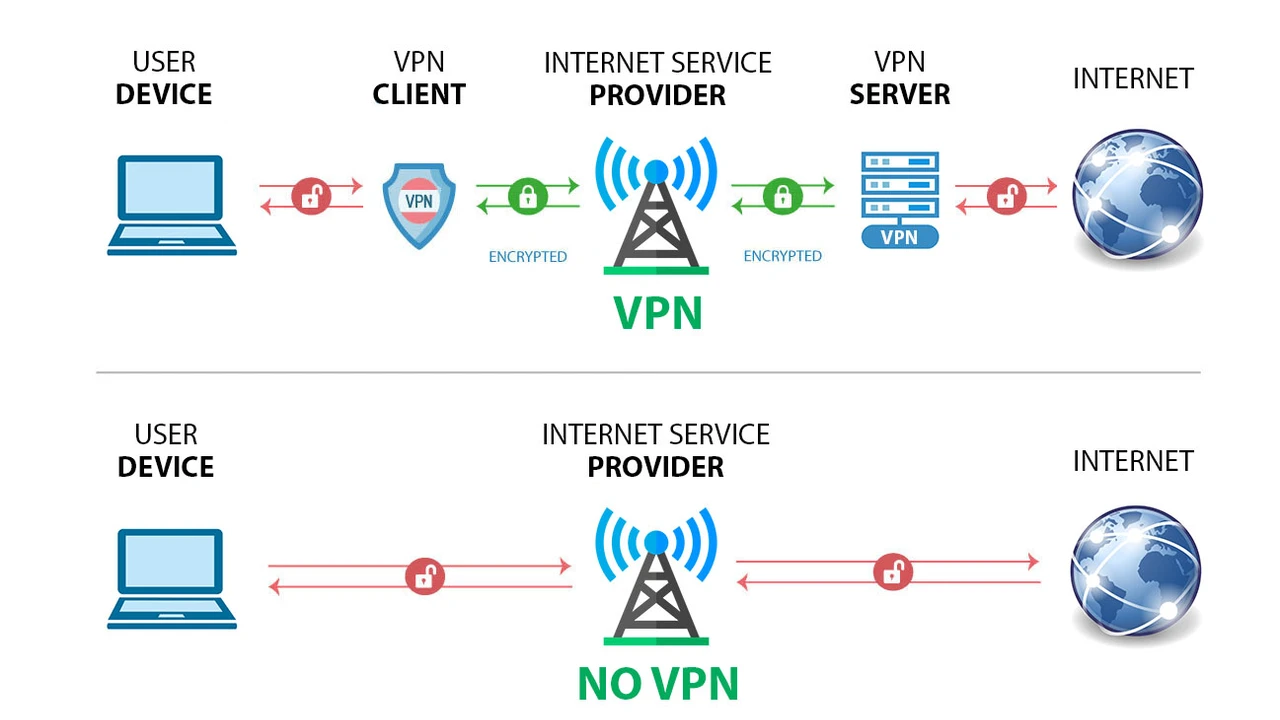
Imagine you're using a VPN. Normally, all your internet traffic goes through the VPN's encrypted tunnel. That's great for security and privacy, but sometimes, you might not want all your traffic to go through it. Maybe you need to access a local network resource (like your printer or a streaming service that only works in your home country) while simultaneously browsing the web securely through your VPN. This is where split tunneling comes to the rescue!
What is Split Tunneling?
Split tunneling is a VPN feature that allows you to choose which applications or websites use the VPN connection and which ones bypass it and connect directly to the internet. Think of it like having two separate lanes for your internet traffic: one encrypted and secure, the other regular and direct.
Why is Split Tunneling Useful for VPN Users?
- Access Local and Foreign Content Simultaneously: You can stream a show from your local streaming service while securely browsing international websites through your VPN. No more constantly connecting and disconnecting!
- Save Bandwidth and Speed: Routing all traffic through a VPN can sometimes slow things down. By only encrypting what needs to be encrypted, you can save bandwidth and maintain faster speeds for non-sensitive tasks.
- Secure Specific Apps: If you only want certain apps (like your banking app or a torrent client) to use the VPN, split tunneling lets you do just that, leaving other apps to use your regular internet connection.
- Printer and Network Access: Many VPNs block access to local network devices. Split tunneling allows you to print documents or access local network drives without disconnecting your VPN.
Types of Split Tunneling for VPNs
There are generally two main types of split tunneling:
- App-based Split Tunneling: This is the most common type. You select specific applications that will either use the VPN or bypass it. For example, you might tell your browser to use the VPN but your gaming client to bypass it.
- Website/IP-based Split Tunneling: Less common but more granular, this allows you to specify certain websites or IP addresses that should use or bypass the VPN.
Top VPNs with Excellent Split Tunneling Features
When it comes to VPNs that offer robust and user-friendly split tunneling, a few names consistently stand out:
ExpressVPN
ExpressVPN is a fan favorite, and for good reason. Their split tunneling feature is available on Windows, Android, and even some router setups. It's incredibly easy to use: you simply go into the settings, enable split tunneling, and then choose which apps you want to exclude from the VPN tunnel. It's perfect for those who want to stream local content while keeping their browsing private. ExpressVPN offers a premium service, and while it's not the cheapest, its reliability, speed, and strong security features, combined with excellent split tunneling, make it a top contender. A 12-month plan typically costs around $6.67/month, often with extra months thrown in.
NordVPN
NordVPN also offers a solid split tunneling feature, primarily on Windows and Android. Their implementation is straightforward, allowing you to select apps to either 'disable VPN for selected apps' or 'enable VPN for selected apps only.' This flexibility is great for different use cases. NordVPN is known for its vast server network and strong security, including features like Double VPN and Onion over VPN. Their pricing is competitive, especially on longer plans, with a 2-year plan often coming in at around $3.29/month.
Surfshark
Surfshark's split tunneling feature, called 'Bypasser,' is available on Windows and Android. It's highly intuitive and allows you to whitelist apps or websites that should bypass the VPN. Surfshark is a fantastic option for those on a budget who don't want to compromise on features. It offers unlimited simultaneous connections, making it great for families or individuals with many devices. A 2-year plan can be as low as $2.49/month, making it one of the most affordable premium VPNs with this feature.
Private Internet Access PIA
PIA offers a highly customizable split tunneling feature on Windows, macOS, and Android. Their client is known for its extensive settings, giving users a lot of control over their VPN connection. PIA is a great choice for tech-savvy users who want to fine-tune their VPN experience. They also boast a massive server network and strong privacy policies. Pricing for PIA is very budget-friendly, with a 2-year plan often around $2.19/month.
The VPN Kill Switch Your Digital Lifeline for Uninterrupted Security
Imagine you're browsing sensitive information or torrenting, and suddenly your VPN connection drops. Without a kill switch, your real IP address and online activity would instantly be exposed to your ISP and potentially other snoopers. That's a privacy nightmare! This is where the VPN kill switch steps in as your digital guardian angel.
What is a VPN Kill Switch?
A VPN kill switch is a security feature that automatically disconnects your device from the internet if your VPN connection unexpectedly drops. Its primary purpose is to prevent your real IP address and unencrypted data from being exposed, ensuring your privacy and anonymity remain intact even during connection interruptions.
Why is a Kill Switch Essential for VPN Users?
- Prevents IP Leaks: The most critical function is to stop your real IP address from being revealed if the VPN tunnel fails.
- Protects Sensitive Data: Ensures that any data you're sending or receiving remains encrypted and doesn't accidentally get transmitted over an unsecured connection.
- Maintains Anonymity: Crucial for users who need to maintain a high level of anonymity, such as journalists, activists, or those in restrictive regions.
- Peace of Mind: You can browse, stream, or download with confidence, knowing that even if your VPN hiccups, your privacy is still protected.
Types of Kill Switches in VPNs
VPN kill switches typically come in two forms:
- Application-level Kill Switch: This type closes specific applications (like your browser or torrent client) if the VPN connection drops. It's less intrusive but might not cover all traffic.
- System-wide Kill Switch: This is the more robust option. It completely cuts off all internet access for your device if the VPN connection fails, ensuring no data leaks whatsoever. This is generally the preferred type for maximum security.
Top VPNs with Reliable Kill Switch Functionality
A reliable kill switch is a non-negotiable feature for any serious VPN user. Here are some VPNs that excel in this area:
ExpressVPN
ExpressVPN's 'Network Lock' (their term for a kill switch) is system-wide and incredibly reliable. It's available on Windows, macOS, and Linux, ensuring comprehensive protection across your main devices. It's always on by default in their desktop apps, which is a huge plus for security-conscious users. As mentioned, ExpressVPN is a premium service, offering top-tier security and speed. Their 12-month plan often includes extra months, bringing the effective monthly cost down to around $6.67.
NordVPN
NordVPN offers both an application-level and a system-wide kill switch on Windows and macOS, and a system-wide kill switch on Android and iOS. This flexibility allows users to choose their preferred level of protection. Their kill switch is highly effective and easy to configure within their app settings. NordVPN's strong security suite, including features like Threat Protection, complements its robust kill switch. A 2-year plan is typically around $3.29/month.
Surfshark
Surfshark provides a reliable system-wide kill switch on Windows, macOS, Android, and iOS. It's a straightforward feature that works exactly as expected, cutting off internet access instantly if the VPN connection drops. Given Surfshark's affordable pricing and unlimited connections, having such a dependable kill switch across all major platforms is a significant value proposition. Their 2-year plan can be as low as $2.49/month.
Proton VPN
Proton VPN, known for its strong focus on privacy and security, offers an excellent kill switch on Windows, macOS, Linux, and Android. Their kill switch is highly effective and is a core part of their commitment to user anonymity. Proton VPN also offers a free tier, but for the full suite of features including a robust kill switch, their paid plans are recommended. A 2-year 'Plus' plan typically costs around $4.99/month.
Ad Blockers and Malware Protection in VPNs Enhancing Your Online Experience
Let's be honest, ads are annoying. They slow down websites, consume data, and can even be vectors for malware. While dedicated ad blockers are great, many VPNs now integrate their own ad and malware blocking features, adding another layer of protection and convenience to your online experience.
What are VPN Ad Blockers and Malware Protection?
These are features built into VPN services that automatically block advertisements, trackers, and known malicious websites or content. When you connect to the VPN, it filters your internet traffic, preventing these unwanted elements from even reaching your device.
Why are Integrated Ad Blockers and Malware Protection Beneficial?
- Cleaner Browsing: Say goodbye to intrusive pop-ups, banner ads, and video ads. Websites load faster and look much cleaner.
- Enhanced Security: Many ads and trackers can contain malicious code or lead to phishing sites. Blocking them at the VPN level significantly reduces your exposure to these threats.
- Reduced Data Usage: Ads consume bandwidth. By blocking them, you can save on data, which is especially useful on mobile plans or metered connections.
- Improved Performance: Websites load quicker when they don't have to download dozens of ad scripts and images.
- Privacy Protection: Ad blockers also often block trackers, preventing companies from monitoring your online behavior and building profiles on you.
How VPN Ad Blockers Work
Typically, these features work by maintaining a blacklist of known ad servers, tracking domains, and malicious websites. When your device tries to connect to one of these blacklisted domains, the VPN intercepts the request and blocks it, preventing the content from loading.
Top VPNs with Excellent Ad Blocker and Malware Protection
While many VPNs offer some form of ad blocking, some do it better than others, often combining it with robust malware protection:
NordVPN
NordVPN's 'Threat Protection' is one of the most comprehensive integrated security features out there. It goes beyond just blocking ads and trackers; it also scans downloaded files for malware, blocks malicious websites, and even prevents you from accessing known phishing sites. It works even when you're not connected to a VPN server, offering continuous protection. This makes NordVPN a fantastic all-in-one security solution. Their 2-year plan, often around $3.29/month, offers great value for this level of protection.
Surfshark
Surfshark's 'CleanWeb' feature is highly effective at blocking ads, trackers, and malware. It's integrated seamlessly into their apps and works across all devices. CleanWeb significantly improves browsing speed and reduces data consumption, making your online experience much smoother and safer. Given Surfshark's unlimited connections and affordable pricing (2-year plan often around $2.49/month), CleanWeb adds significant value to an already feature-rich VPN.
CyberGhost
CyberGhost offers a built-in 'Block Content' feature that effectively blocks ads, trackers, and malicious websites. It's easy to enable within their app settings and contributes to a faster, cleaner, and safer browsing experience. CyberGhost is known for its user-friendly interface and specialized servers for streaming and torrenting. Their longer plans, like the 2-year or 3-year options, offer excellent value, often starting around $2.19/month.
Private Internet Access PIA
PIA includes a feature called 'PIA MACE' which acts as an ad, tracker, and malware blocker. It works at the DNS level, preventing your device from even connecting to known malicious or advertising domains. MACE is highly effective and adds another layer of security to PIA's already robust offering. As a budget-friendly option with extensive features, PIA (2-year plan around $2.19/month) provides great value for users looking for integrated protection.
Other Essential VPN Features to Look For
Beyond split tunneling, kill switches, and ad blockers, there are a few other features that can significantly enhance your VPN experience. Knowing about these will help you choose the best VPN for your specific needs.
No-Logs Policy What It Means for Your Privacy
A 'no-logs policy' is arguably the most critical feature for privacy-conscious users. It means the VPN provider does not collect, store, or share any data about your online activities, such as your browsing history, connection timestamps, IP addresses, or bandwidth usage. Look for VPNs that have had their no-logs policy independently audited by third parties. This provides an extra layer of assurance that they truly adhere to their claims.
Strong Encryption Protocols Securing Your Data
The encryption protocol determines how your data is secured. The industry standard is AES-256 encryption, often referred to as 'military-grade.' Beyond the encryption itself, the protocols used are crucial. Look for VPNs that support:
- OpenVPN: A highly secure and customizable open-source protocol.
- WireGuard: A newer, faster, and more efficient protocol that offers excellent security.
- IKEv2/IPsec: A stable and fast protocol, particularly good for mobile devices due to its ability to re-establish connections quickly.
Server Network Size and Distribution Accessing Content Globally
A large and geographically diverse server network means you'll have more options for connecting to different locations, which is great for bypassing geo-restrictions and finding faster servers. More servers also mean less congestion, leading to better speeds. For users in the USA and Southeast Asia, having a good number of servers in these regions is particularly beneficial for local access and performance.
Simultaneous Connections Protecting All Your Devices
This feature tells you how many devices you can connect to the VPN simultaneously with a single subscription. If you have a laptop, phone, tablet, and maybe a smart TV, you'll want a VPN that allows multiple connections. Some VPNs, like Surfshark, even offer unlimited simultaneous connections, which is fantastic value for families or individuals with many gadgets.
Dedicated IP Addresses For Specific Use Cases
While most VPNs assign you a shared IP address (which enhances anonymity), some offer the option to purchase a 'dedicated IP address.' This means you're the only one using that specific IP. It can be useful for avoiding CAPTCHAs, accessing certain corporate networks, or running a server, as it reduces the chances of your IP being blacklisted due to other users' activities.
Obfuscated Servers Bypassing Strict Censorship
Also known as 'stealth servers,' obfuscated servers are designed to make your VPN traffic look like regular internet traffic. This is crucial in countries with strict internet censorship (like China or Iran) where VPN usage is often detected and blocked. If you're in or traveling to such regions, this feature is a must-have.
Smart DNS for Streaming Unblocking Content
While not a full VPN, Smart DNS is often included as a VPN feature. It allows you to unblock geo-restricted content on devices that don't natively support VPN apps (like some smart TVs or gaming consoles). It doesn't encrypt your traffic, so it's faster than a VPN for streaming but offers no privacy benefits.
Putting It All Together Choosing Your Ideal VPN
So, you've learned about split tunneling, kill switches, ad blockers, and a bunch of other cool VPN features. Now, how do you choose the right one for you? It really boils down to your specific needs and priorities.
- For Ultimate Privacy and Security: Prioritize a strong no-logs policy (preferably audited), a reliable system-wide kill switch, and robust encryption protocols (OpenVPN, WireGuard). Proton VPN and ExpressVPN are excellent choices here.
- For Seamless Streaming and Gaming: Look for VPNs with good speeds, a large server network, and potentially Smart DNS. Split tunneling can also be useful for accessing local content. ExpressVPN, NordVPN, and CyberGhost often perform well in this category.
- For Budget-Conscious Users: Surfshark and Private Internet Access offer a fantastic balance of features, security, and affordability, especially on longer plans.
- For All-Round Protection and Convenience: NordVPN with its 'Threat Protection' and comprehensive feature set is a strong contender for those who want an all-in-one solution.
- For Bypassing Censorship: Obfuscated servers are key. ExpressVPN and NordVPN are known for their effectiveness in restrictive environments.
Remember, the best VPN is the one that fits your individual requirements. Don't be afraid to take advantage of free trials or money-back guarantees to test out different services and see which one feels right for you. Happy browsing, and stay safe out there!
:max_bytes(150000):strip_icc()/277019-baked-pork-chops-with-cream-of-mushroom-soup-DDMFS-beauty-4x3-BG-7505-5762b731cf30447d9cbbbbbf387beafa.jpg)