VPN Browser Extensions vs Desktop Apps Which is Better
Understand the differences between VPN browser extensions and full desktop apps. Compare their features, security, and usability.

Understand the differences between VPN browser extensions and full desktop apps. Compare their features, security, and usability.
VPN Browser Extensions vs Desktop Apps Which is Better
When you’re looking to enhance your online privacy and security, a Virtual Private Network (VPN) is often the first solution that comes to mind. But once you decide to use a VPN, you’re immediately faced with another choice: should you opt for a full desktop VPN application or a more lightweight browser extension? This isn't just a matter of preference; it's a decision that significantly impacts your online protection, the scope of your privacy, and your overall user experience. Let's dive deep into the nuances of VPN browser extensions versus desktop apps, exploring their functionalities, security implications, usability, and ultimately, which option might be better for your specific needs, especially if you're browsing from the USA or Southeast Asia.
Understanding VPN Browser Extensions What They Are and How They Work
VPN browser extensions are typically small, lightweight add-ons that you install directly into your web browser (like Chrome, Firefox, Edge, or Brave). They are designed to encrypt and route your browser's traffic through a VPN server. This means that only the data passing through that specific browser is protected by the VPN. Other applications on your device, such as email clients, gaming apps, or other browsers, will continue to use your regular, unprotected internet connection.
Key Characteristics of Browser Extensions
- Limited Scope: They only protect browser traffic.
- Ease of Use: Often very simple to install and operate, with a quick toggle on/off switch.
- Lightweight: They consume fewer system resources compared to full desktop apps.
- Proxy-like Functionality: Many free browser extensions are actually just proxies, offering IP masking but often lacking true encryption.
- Specific Browser Integration: They are tied to a single browser.
Common Use Cases for Browser Extensions
Browser extensions are great for:
- Quickly changing your IP address to access geo-restricted content on streaming sites within your browser.
- Bypassing simple website blocks at work or school.
- Adding a layer of privacy to your casual browsing sessions without affecting other applications.
Understanding Full Desktop VPN Applications What They Are and How They Work
A full desktop VPN application is a standalone software that you install directly onto your operating system (Windows, macOS, Linux, Android, iOS). Unlike browser extensions, these applications create a secure tunnel for all internet traffic originating from your device. This means every application, every browser, and every background process that connects to the internet will have its data encrypted and routed through the VPN server.
Key Characteristics of Desktop Apps
- Comprehensive Protection: Secures all internet traffic on your device.
- Robust Security Features: Includes advanced features like kill switches, DNS leak protection, and various VPN protocols (OpenVPN, WireGuard, IKEv2).
- System-Wide Encryption: Ensures all data leaving your device is encrypted.
- More Resource Intensive: Generally uses more system resources than a browser extension, though modern apps are highly optimized.
- Device-Wide Control: Manages your VPN connection for the entire device.
Common Use Cases for Desktop Apps
Desktop apps are ideal for:
- Ensuring complete online privacy and anonymity across all applications.
- Securing sensitive activities like online banking, email, and file transfers.
- Protecting your entire device on public Wi-Fi networks.
- Torrenting and P2P file sharing securely.
- Bypassing censorship and geo-restrictions for all internet-connected services.
Feature Comparison VPN Browser Extensions vs Desktop Apps
Let's break down the key differences in features that matter most to users in the USA and Southeast Asia, focusing on privacy, security, and usability.
Security and Encryption VPN Protection Levels
This is arguably the most critical differentiator. Most reputable desktop VPN apps use strong encryption standards like AES-256, coupled with robust protocols such as OpenVPN, WireGuard, or IKEv2. They also include essential security features like a kill switch (which automatically disconnects your internet if the VPN connection drops, preventing IP leaks) and DNS leak protection. These features ensure that your entire digital footprint is protected.
Browser extensions, on the other hand, often provide a more limited form of protection. While some premium VPN providers offer extensions that leverage their full VPN infrastructure (meaning they do offer encryption), many free or less reputable extensions function more like proxies. Proxies can change your IP address but typically don't encrypt your traffic, leaving your data vulnerable to interception. Even encrypted browser extensions only protect browser traffic, leaving other applications exposed.
Verdict: Desktop apps offer superior, comprehensive security and encryption for your entire device. Browser extensions provide partial protection, and many are essentially unencrypted proxies.
Privacy and Anonymity Scope of Protection
For true privacy and anonymity, a desktop VPN app is the clear winner. It ensures that your ISP, government agencies, and malicious actors cannot monitor any of your online activities, regardless of the application you're using. This is crucial for users in regions with strict internet surveillance or censorship, such as parts of Southeast Asia, or for those in the USA concerned about data retention laws.
Browser extensions only mask your IP address and encrypt traffic within that specific browser. If you open another browser, use a messaging app, or play an online game, your real IP address and unencrypted data will be exposed. This significantly compromises your overall privacy posture.
Verdict: Desktop apps provide system-wide privacy and anonymity. Browser extensions offer limited, browser-specific privacy.
Usability and Convenience Ease of Access
Browser extensions are incredibly convenient. They are usually a one-click install, and you can toggle them on or off directly from your browser toolbar. This makes them very user-friendly for quick IP changes or accessing geo-restricted content within a browser tab.
Desktop apps require a slightly more involved installation process and run as a separate application. However, modern VPN apps are designed to be very intuitive, with simple interfaces for connecting, changing servers, and configuring settings. Once set up, they often connect automatically on startup, providing seamless, always-on protection.
Verdict: Browser extensions win on sheer convenience for browser-specific tasks. Desktop apps offer excellent usability for comprehensive, always-on protection.
Performance and Speed Impact on Browsing
Both desktop apps and browser extensions can impact your internet speed, as routing traffic through a VPN server adds latency and overhead. However, desktop apps often have more advanced features for optimizing speed, such as choosing specific protocols (like WireGuard for speed) or connecting to specialized servers (e.g., for streaming or gaming).
Browser extensions, especially those that are essentially proxies, might offer faster speeds initially because they do less work (no encryption). But for encrypted extensions, the performance can be comparable to a desktop app for browser traffic. The key difference is that a desktop app's performance affects your entire device, while an extension's performance is limited to the browser.
Verdict: Desktop apps generally offer more control over performance optimization. Browser extensions can be fast for browser-only tasks, but their performance is limited in scope.
Additional Features Beyond Basic VPN Functionality
Desktop VPN apps come packed with features that browser extensions simply cannot offer:
- Kill Switch: Essential for preventing data leaks if the VPN connection drops.
- DNS Leak Protection: Ensures your DNS requests are routed through the VPN, preventing your ISP from seeing your browsing activity.
- Split Tunneling: Allows you to choose which apps use the VPN and which connect directly to the internet.
- Obfuscated Servers: Designed to bypass strict firewalls and deep packet inspection, crucial in censored regions.
- Ad and Malware Blockers: Many premium VPN apps include these built-in.
- Dedicated IP Addresses: Some providers offer static IP addresses for specific use cases.
- Multi-hop/Double VPN: Routes your traffic through two VPN servers for enhanced security.
Browser extensions typically offer very few, if any, of these advanced features. Their functionality is usually limited to connecting to a server and changing your IP.
Verdict: Desktop apps offer a rich suite of advanced features for enhanced security, privacy, and flexibility.
Recommended VPNs for Desktop Apps and Browser Extensions
Let's look at some top-tier VPN providers that offer excellent desktop applications and, in some cases, robust browser extensions, catering to users in the USA and Southeast Asia.
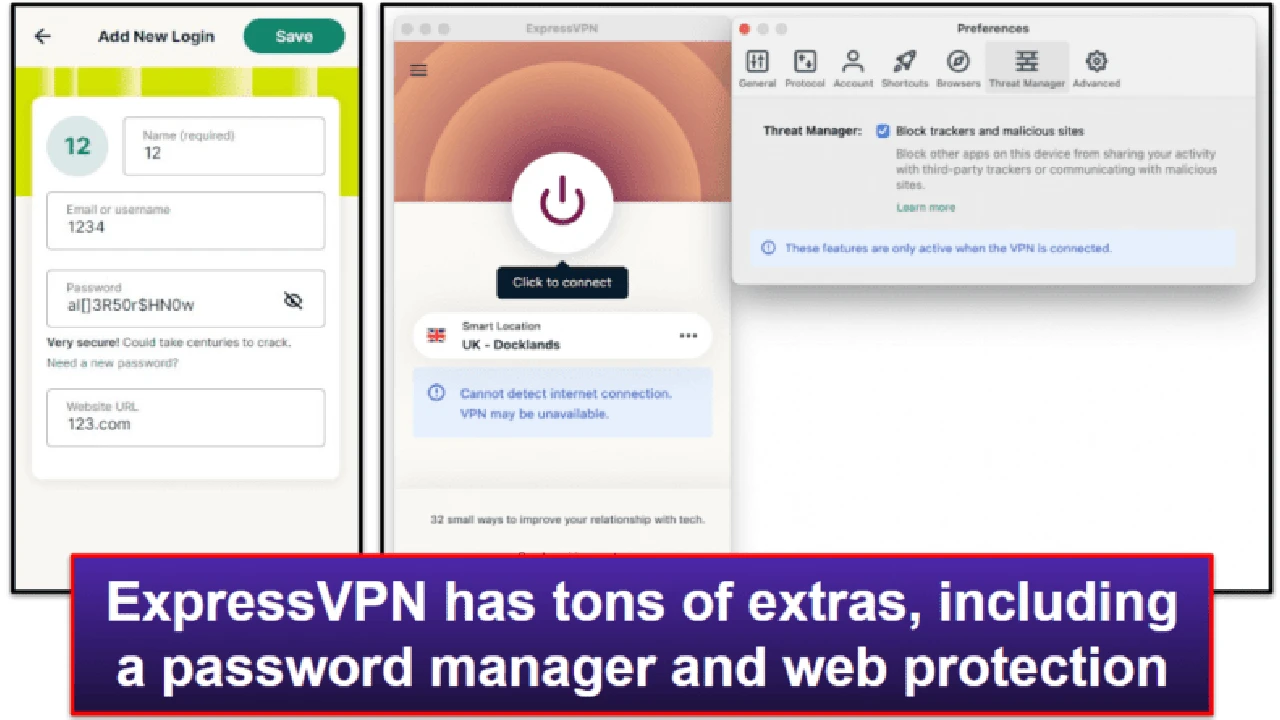
ExpressVPN A Premium Choice for Both
Desktop App: ExpressVPN's desktop application is renowned for its user-friendliness, blazing-fast speeds, and robust security features. It offers AES-256 encryption, a reliable kill switch, DNS leak protection, and a wide range of servers globally, including numerous options in the USA and across Southeast Asia (e.g., Singapore, Thailand, Vietnam, Philippines). It supports OpenVPN, IKEv2, and its proprietary Lightway protocol, which is excellent for speed and security. It's perfect for streaming, gaming, and securing all your online activities.
Browser Extension: ExpressVPN also offers browser extensions for Chrome, Firefox, and Edge. These extensions are unique because they act as a remote control for the desktop app. This means that when you use the extension, it activates the full desktop VPN client, providing system-wide protection and all the advanced features. This offers the best of both worlds: the convenience of an extension with the comprehensive security of a desktop app. However, it requires the desktop app to be installed and running.
Pricing: Starts around $6.67/month for a 12-month plan, often with extra months free. They offer a 30-day money-back guarantee.
NordVPN Feature-Rich and Secure
Desktop App: NordVPN's desktop application is a powerhouse of features. It boasts strong AES-256 encryption, a customizable kill switch, DNS leak protection, and specialized servers (P2P, obfuscated, Double VPN, Onion Over VPN). Its NordLynx protocol (based on WireGuard) offers excellent speeds. With a vast server network, including extensive coverage in the USA and key Southeast Asian countries, NordVPN is ideal for privacy-conscious users and those needing to bypass censorship.
Browser Extension: NordVPN provides browser extensions for Chrome, Firefox, and Edge. Unlike ExpressVPN's, these extensions function more as standalone proxies. They encrypt your browser traffic and change your IP but do not offer the full suite of security features like a kill switch or system-wide protection. They are useful for quick geo-unblocking within the browser but should not be relied upon for comprehensive security.
Pricing: Starts around $3.79/month for a 2-year plan. Also comes with a 30-day money-back guarantee.
Surfshark Unlimited Connections and Great Value
Desktop App: Surfshark's desktop application is known for its unlimited simultaneous connections, making it excellent value for families or individuals with many devices. It offers strong encryption, a reliable kill switch, and a CleanWeb feature (ad, tracker, and malware blocker). It supports WireGuard, OpenVPN, and IKEv2 protocols. Its server network is growing rapidly, with good coverage in the USA and Southeast Asia.
Browser Extension: Surfshark offers extensions for Chrome, Firefox, and Edge. Similar to NordVPN, these extensions primarily function as encrypted proxies for your browser traffic. They are good for basic IP masking and unblocking but lack the full security features of the desktop app. They do include the CleanWeb ad blocker, which is a nice bonus.
Pricing: Starts around $2.49/month for a 2-year plan. Includes a 30-day money-back guarantee.
Proton VPN Privacy Focused and Transparent
Desktop App: Proton VPN, from the creators of ProtonMail, is highly regarded for its strong privacy stance and transparency. Its desktop app offers robust security with AES-256 encryption, Secure Core servers (multi-hop through privacy-friendly countries), a kill switch, and DNS leak protection. It supports OpenVPN, WireGuard, and IKEv2. While its server network might be smaller than some competitors, it focuses on quality and security, with servers in the USA and key Asian locations.
Browser Extension: Proton VPN does not currently offer dedicated browser extensions. This aligns with their philosophy of providing comprehensive, system-wide protection rather than partial browser-only solutions.
Pricing: Free tier available with limited features. Paid plans start around $4.99/month for a 2-year plan. 30-day money-back guarantee.
CyberGhost User-Friendly and Streaming Optimized
Desktop App: CyberGhost's desktop application is very user-friendly, making it a great choice for beginners. It offers strong encryption, a kill switch, and specialized servers optimized for streaming, gaming, and torrenting. It has a massive server network, including extensive coverage in the USA and various Southeast Asian countries. It's a solid all-around performer for general use and media consumption.
Browser Extension: CyberGhost offers a free browser extension for Chrome and Firefox. This extension is a basic proxy service, meaning it changes your IP address but does not provide the same level of encryption or security features as the full desktop app. It's useful for simple geo-unblocking but not for serious privacy needs.
Pricing: Starts around $2.19/month for a 2-year plan. Offers a generous 45-day money-back guarantee.
When to Use Which Making the Right Choice
The choice between a VPN browser extension and a desktop app largely depends on your specific needs and threat model.
Choose a Desktop VPN App If You Need
- Comprehensive Security: You want all your internet traffic, from all applications, to be encrypted and secured. This is crucial for sensitive activities like online banking, handling personal data, or working remotely.
- Maximum Privacy: You want to ensure your entire digital footprint is anonymous and protected from your ISP, government surveillance, and advertisers.
- Advanced Features: You need features like a kill switch, DNS leak protection, split tunneling, or obfuscated servers to bypass strict censorship or enhance security.
- Torrenting or P2P: You engage in file sharing and need robust protection to avoid legal issues or ISP throttling.
- Gaming: You want to reduce lag and protect yourself from DDoS attacks while gaming.
- Protection on Public Wi-Fi: You frequently connect to unsecured public networks and need to protect all your device's communications.
- Operating in High-Censorship Regions: If you're in a country with strict internet controls, a full VPN app with obfuscation is often necessary.
Choose a VPN Browser Extension If You Need
- Quick Geo-Unblocking: You primarily want to access geo-restricted content on streaming sites or bypass simple website blocks within your browser.
- Casual Browsing Privacy: You want a basic layer of IP masking for casual browsing without affecting other applications on your device.
- Simplicity and Convenience: You prefer a very lightweight, easy-to-use solution that integrates directly into your browser.
- Limited Budget (Free Extensions): You're looking for a free solution, understanding its inherent limitations in security and privacy.
Hybrid Approach The Best of Both Worlds
For many users, a hybrid approach might be the most practical. Use a full desktop VPN application for your primary security and privacy needs, ensuring all your device's traffic is protected. Then, for specific, less sensitive tasks, you might use a browser extension (especially one that acts as a remote control for the desktop app, like ExpressVPN's) for quick server switching or specific browser-only unblocking.
However, it's crucial to understand that using a standalone browser extension (that isn't a remote control for a desktop app) alongside a desktop app can sometimes lead to conflicts or unexpected behavior. Generally, if you have a desktop VPN app running, the browser extension is redundant or might even interfere with the app's system-wide protection.
Final Thoughts on Your VPN Choice
For anyone serious about their online privacy and security, especially in regions like the USA and Southeast Asia where digital surveillance and geo-restrictions are prevalent, a full desktop VPN application is the unequivocally superior choice. It provides comprehensive, system-wide protection, robust encryption, and a suite of advanced features that browser extensions simply cannot match.
Browser extensions have their place for specific, less critical tasks, offering convenience for quick IP changes within a browser. But they should never be considered a substitute for the robust security and privacy offered by a dedicated VPN application. Always prioritize a reputable VPN provider that offers a strong desktop client, and if you choose to use an extension, ensure it's from the same trusted provider and understand its limitations.
Invest in a quality desktop VPN app to safeguard your entire digital life. Your privacy and security are worth the comprehensive protection it provides.
:max_bytes(150000):strip_icc()/277019-baked-pork-chops-with-cream-of-mushroom-soup-DDMFS-beauty-4x3-BG-7505-5762b731cf30447d9cbbbbbf387beafa.jpg)