VPN Privacy Best Practices Tips for Maximum Protection
Beyond choosing a VPN, learn best practices for maximizing your online privacy. Tips for configuring your VPN and maintaining anonymity.
Beyond choosing a VPN, learn best practices for maximizing your online privacy. Tips for configuring your VPN and maintaining anonymity.
VPN Privacy Best Practices Tips for Maximum Protection
So, you've taken the plunge and invested in a Virtual Private Network (VPN) – fantastic! That's a huge first step towards reclaiming your online privacy. But here's the thing: simply installing a VPN app isn't a magic bullet. To truly maximize your protection and maintain anonymity in today's increasingly surveilled digital landscape, you need to adopt some smart privacy best practices. Think of your VPN as a powerful security tool; like any tool, its effectiveness depends on how you use it. This guide will walk you through essential tips, configuration advice, and lifestyle changes to ensure your VPN works as hard as possible for your privacy.
Understanding Your VPN's Core Privacy Features and Settings
Before we dive into advanced tips, let's quickly recap some fundamental VPN features and how to configure them for optimal privacy. Knowing these ins and outs is crucial for both beginners and seasoned users.
Kill Switch Activation Your Digital Lifeline
A kill switch is arguably one of the most critical privacy features a VPN offers. It's your digital lifeline. If your VPN connection unexpectedly drops, a kill switch automatically disconnects your device from the internet, preventing your real IP address and unencrypted data from being exposed. This is especially vital for activities where anonymity is paramount, like torrenting or accessing sensitive information.
How to use it: Most reputable VPNs have a kill switch feature built into their applications. Make sure it's enabled in your VPN's settings. For example, NordVPN and ExpressVPN offer robust kill switches that are easy to find and activate. Always double-check that it's active, especially after software updates or reinstallation.
DNS Leak Protection Securing Your Domain Name System Queries
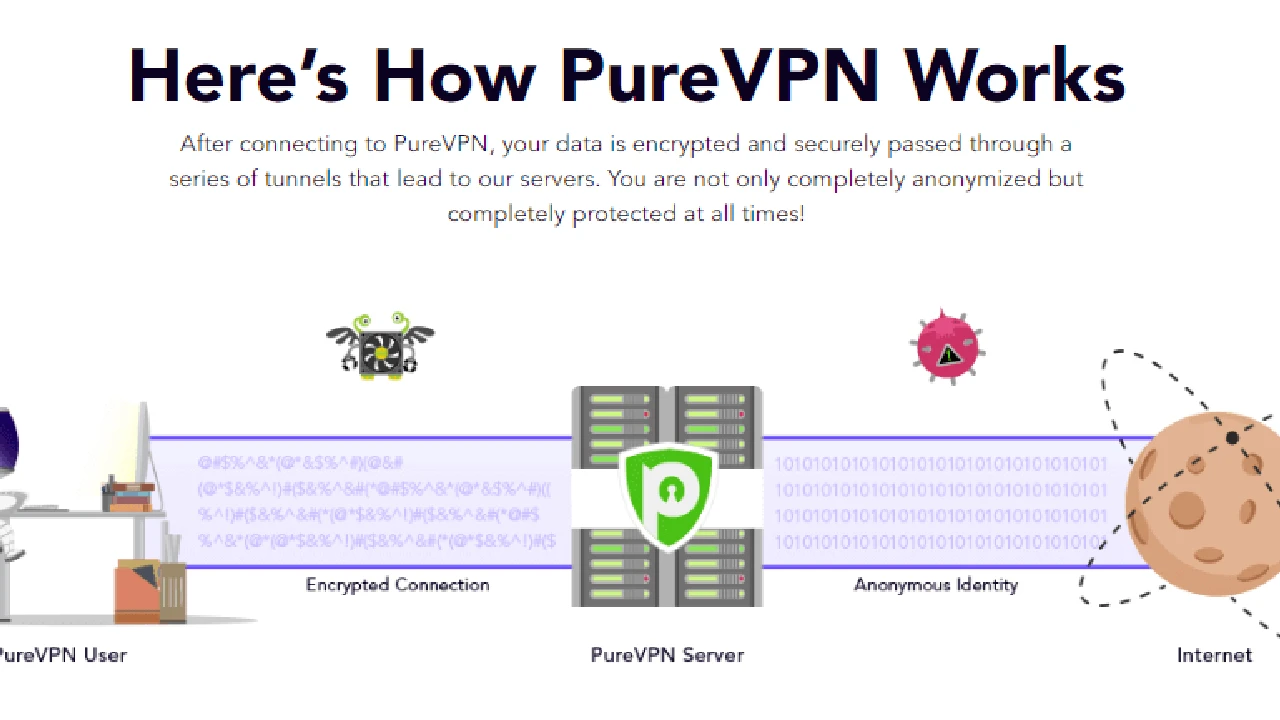
Your Domain Name System (DNS) requests translate website names (like google.com) into IP addresses. Without proper protection, these requests can bypass your VPN tunnel and reveal your browsing activity to your Internet Service Provider (ISP) or other snoopers, even if your VPN is active. This is known as a DNS leak.
How to use it: A good VPN will route your DNS requests through its own secure, encrypted servers, preventing leaks. Most premium VPNs, such as Surfshark and Proton VPN, include automatic DNS leak protection. You can also perform a quick DNS leak test online to ensure your VPN is functioning correctly.
IPv6 Leak Protection Guarding Against the Next-Gen Protocol
Similar to DNS leaks, IPv6 leaks can expose your real IP address. While IPv4 is still dominant, IPv6 is becoming more common. If your VPN doesn't properly handle IPv6 traffic, your device might default to an unencrypted IPv6 connection, revealing your identity.
How to use it: Many VPNs offer an option to disable IPv6 or route it through the VPN tunnel. Check your VPN's settings for IPv6 leak protection. If your VPN doesn't offer this, you might consider disabling IPv6 on your operating system as a workaround, though this can sometimes cause minor connectivity issues.
Split Tunneling Selective VPN Protection
Split tunneling allows you to choose which applications or websites use the VPN tunnel and which access the internet directly. This can be useful for specific scenarios where you need to access local network resources or services that block VPNs, while still protecting other traffic.
How to use it: While convenient, use split tunneling cautiously for privacy. Only route non-sensitive traffic outside the VPN. For maximum privacy, it's generally best to route all traffic through the VPN. ExpressVPN and CyberGhost are examples of VPNs that offer user-friendly split tunneling features.
Choosing the Right VPN Server for Enhanced Anonymity and Performance
The server you connect to plays a significant role in your privacy and performance. Don't just pick the closest one; consider these factors:
Jurisdiction Matters Understanding Server Locations and Laws
The country where your VPN server is located can impact your privacy. Countries with strong privacy laws and no mandatory data retention policies (like Switzerland or Panama) are generally preferred. Avoid servers in countries that are part of intelligence-sharing alliances like the 5 Eyes, 9 Eyes, or 14 Eyes, as these jurisdictions might compel VPN providers to log user data.
Recommendation: Look for VPNs with servers in privacy-friendly locations. For example, NordVPN has servers in Panama, and Proton VPN is based in Switzerland, both known for strong privacy protections.
Obfuscated Servers Bypassing VPN Blocks and Deep Packet Inspection
Some networks, especially in highly censored regions or corporate environments, use deep packet inspection (DPI) to detect and block VPN traffic. Obfuscated servers (also known as stealth servers) disguise your VPN traffic as regular HTTPS traffic, making it harder to detect and block.
When to use it: If you're in a country with strict internet censorship (like China or UAE) or on a network that blocks VPNs, an obfuscated server is your best bet. ExpressVPN's 'TrustedServer' technology and NordVPN's 'Obfuscated Servers' are excellent examples of this feature.
Double VPN Multi-Hop for Layered Security
A Double VPN (or Multi-Hop) routes your internet traffic through two separate VPN servers, encrypting your data twice. This adds an extra layer of security and makes it significantly harder to trace your online activities back to you.
When to use it: While it can slightly reduce speed due to the double encryption, Double VPN is ideal for highly sensitive activities where maximum anonymity is required. NordVPN and Surfshark both offer robust Double VPN options.
Beyond the VPN Browser and Device Configuration for Privacy
Your VPN is a powerful tool, but it's just one piece of the privacy puzzle. Your browser, operating system, and general online habits also play a crucial role.
Secure Browser Choices Firefox and Brave for Enhanced Privacy
Even with a VPN, your browser can leak information. Ditch Chrome, Edge, and Safari if privacy is your priority. Instead, opt for privacy-focused browsers:
- Mozilla Firefox: Highly customizable, open-source, and offers strong privacy settings. Combine it with extensions like uBlock Origin and Privacy Badger.
- Brave Browser: Built-in ad and tracker blocker, HTTPS Everywhere, and fingerprinting protection. It's fast and privacy-centric right out of the box.
- Tor Browser: For ultimate anonymity, especially when combined with a VPN. Tor routes your traffic through multiple relays, making it extremely difficult to trace.
Browser Extensions for Ad Blocking and Tracking Prevention
Even with a good browser, extensions can further enhance your privacy:
- uBlock Origin: An efficient wide-spectrum blocker that blocks ads, trackers, and malware sites.
- Privacy Badger: Learns to block invisible trackers automatically.
- HTTPS Everywhere: Encrypts your communications with many major websites, making your browsing more secure.
Cookie Management and Fingerprinting Protection
Cookies track your activity across websites. Regularly clear your cookies or use browser settings to block third-party cookies. Browser fingerprinting is an even more insidious tracking method that identifies you based on your browser's unique configuration. Privacy-focused browsers and extensions can help mitigate this.
Operating System Privacy Settings Windows macOS Android iOS
Your operating system collects a lot of data. Take the time to review and adjust your privacy settings on Windows, macOS, Android, and iOS. Disable telemetry, location services (when not needed), and personalized ads. Consider using privacy-focused operating systems like Linux distributions for maximum control.
Secure Search Engines DuckDuckGo and Startpage
Google tracks your searches and builds a profile on you. Switch to privacy-focused search engines that don't log your queries or track your activity:
- DuckDuckGo: Doesn't track you, offers clean search results, and includes a built-in tracker blocker.
- Startpage: Provides Google search results anonymously, acting as a proxy between you and Google.
Digital Hygiene and Online Habits for Comprehensive Privacy
Your behavior online is just as important as your tools. Adopt these habits for a truly private digital life.
Strong Unique Passwords and Two-Factor Authentication 2FA
A VPN protects your connection, but weak passwords leave your accounts vulnerable. Use strong, unique passwords for every account, ideally generated by a password manager. Enable Two-Factor Authentication (2FA) wherever possible for an extra layer of security.
Public Wi-Fi Caution Always Use Your VPN
Public Wi-Fi networks are notorious for security risks. Always assume they are insecure. Never connect to public Wi-Fi without your VPN active. This encrypts your data and protects you from eavesdroppers and malicious hotspots.
Avoiding Phishing Scams and Malicious Links
No VPN can protect you from clicking a malicious link or falling for a phishing scam. Be vigilant. Always verify the sender of emails, hover over links before clicking, and be suspicious of unsolicited messages.
Limiting Information Sharing on Social Media
Social media platforms are data vacuums. Be mindful of what you share. Adjust your privacy settings, limit personal information, and think twice before posting anything that could be used to identify or track you.
Regular Software Updates Patching Vulnerabilities
Keep your operating system, browser, VPN app, and all other software updated. Software updates often include critical security patches that fix vulnerabilities that could be exploited by attackers.
Understanding Data Retention Policies and Terms of Service
Before signing up for any online service, including your VPN, read their privacy policy and terms of service. Understand what data they collect, how long they retain it, and whether they share it with third parties. A truly privacy-focused VPN will have a strict no-logs policy, ideally independently audited.
Recommended VPNs for Maximum Privacy and Their Features
While many VPNs claim to be privacy-focused, some stand out due to their audited no-logs policies, advanced features, and commitment to user anonymity. Here are a few top contenders:
ExpressVPN A Premium Choice for Speed and Security
Key Privacy Features:
- TrustedServer Technology: Runs all servers on RAM, meaning data is wiped with every reboot, ensuring no logs are ever stored on disk. This has been independently audited.
- Audited No-Logs Policy: ExpressVPN's no-logs policy has been independently audited by PwC, confirming their claims.
- Jurisdiction: Based in the British Virgin Islands, a privacy-friendly jurisdiction with no data retention laws.
- Kill Switch (Network Lock): Robust kill switch that prevents data leaks.
- DNS/IPv6 Leak Protection: Built-in protection against various leaks.
- Proprietary Lightway Protocol: Designed for speed and security, open-sourced for transparency.
Use Cases: Excellent for general browsing, streaming, torrenting, and bypassing censorship due to its speed and obfuscation capabilities. Ideal for users in the USA and Southeast Asia seeking reliable, high-performance privacy.
Pricing: Typically starts around $6.67/month for a 12-month plan, often with extra months free. Offers a 30-day money-back guarantee.
NordVPN Robust Security and Advanced Privacy Tools
Key Privacy Features:
- Audited No-Logs Policy: NordVPN has undergone multiple independent audits of its no-logs policy by PwC and Deloitte.
- Jurisdiction: Based in Panama, another privacy-friendly country.
- Double VPN (Multi-Hop): Routes traffic through two servers for enhanced encryption and anonymity.
- Obfuscated Servers: Designed to bypass VPN blocks and deep packet inspection.
- Threat Protection: Blocks ads, trackers, and malicious websites.
- Custom DNS: Allows users to set their own DNS servers.
- Kill Switch: Both an application-specific and system-wide kill switch.
Use Cases: Great for users who prioritize advanced security features like Double VPN and obfuscation. Good for streaming, torrenting, and securing sensitive communications. Popular in both the USA and Southeast Asia markets.
Pricing: Often starts around $3.99/month for a 2-year plan. Offers a 30-day money-back guarantee.
Surfshark Unlimited Connections and Strong Privacy
Key Privacy Features:
- Audited No-Logs Policy: Surfshark's no-logs policy has been independently audited by Cure53.
- Jurisdiction: Based in the Netherlands, which has strong privacy laws, though it is part of the 9 Eyes alliance. However, their no-logs policy mitigates this concern.
- CleanWeb: Blocks ads, trackers, and malware.
- Camouflage Mode (Obfuscation): Hides your VPN usage from your ISP.
- MultiHop (Double VPN): Routes traffic through two servers.
- NoBorders Mode: Helps bypass geo-restrictions and censorship.
- Unlimited Simultaneous Connections: Protect all your devices with one subscription.
Use Cases: Excellent value for money, especially for families or individuals with many devices. Strong privacy features make it suitable for general use, streaming, and torrenting. Gaining popularity in Southeast Asia due to its affordability and features.
Pricing: Very competitive, often starting around $2.49/month for a 2-year plan. Offers a 30-day money-back guarantee.
Proton VPN Swiss-Based and Privacy-Focused
Key Privacy Features:
- Jurisdiction: Based in Switzerland, known for its strong privacy laws and neutrality.
- Audited No-Logs Policy: Independently audited.
- Secure Core Servers: Routes traffic through hardened servers in privacy-friendly countries (Switzerland, Iceland, Sweden) before going to your chosen server.
- Open-Source Apps: All apps are open-source and independently audited, ensuring transparency.
- NetShield Ad-Blocker: Blocks ads, trackers, and malware.
- Strong Encryption: Uses AES-256 and ChaCha20 encryption.
- Free Tier: Offers a respectable free version with no data limits, though with fewer features and slower speeds.
Use Cases: Ideal for privacy purists and those who value transparency and strong legal protections. Excellent for journalists, activists, and anyone needing maximum anonymity. While its free tier is great, the paid version unlocks its full potential.
Pricing: Starts around $4.99/month for a 2-year plan. Offers a 30-day money-back guarantee.
Final Thoughts on Your Privacy Journey
Achieving maximum online privacy is an ongoing journey, not a one-time setup. It requires a combination of robust tools like a premium VPN, smart configuration, and diligent online habits. By implementing these best practices, you're not just using a VPN; you're actively building a more secure and anonymous digital life for yourself. Stay informed, stay vigilant, and keep your privacy settings locked down. Your digital freedom depends on it.
:max_bytes(150000):strip_icc()/277019-baked-pork-chops-with-cream-of-mushroom-soup-DDMFS-beauty-4x3-BG-7505-5762b731cf30447d9cbbbbbf387beafa.jpg)